Reconcile your Adyen receivables faster with the new Account Receivable reconciliation feature
Generate self-service receivable statements in the Customer Area that align with your closing schedule and time zone. Reconcile faster with transaction-level detail and clear finance reporting.
April 2026
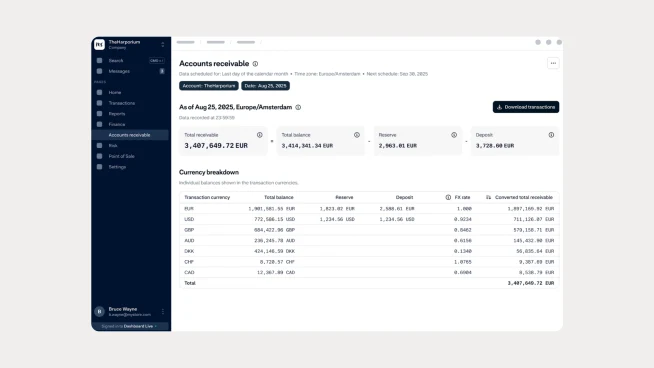
A new way to view and confirm your receivables
You can now access Account Receivable statements directly in the Customer Area. This new feature gives your finance teams a clear view of how much Adyen owes you for processed payments. The statements are designed to support month-end close by providing accurate balances and transaction-level details in a format that aligns with your accounting workflows.
Built for faster and clearer reconciliation
The new Account Receivable view removes common reconciliation challenges. You can configure statements based on your preferred closing schedule and time zone instead of relying on fixed CEST reporting. The report uses finance-friendly terminology and lets you download a CSV with the full transaction breakdown behind your receivable balance. You can also view your receivable in processing currencies or convert it into a single base currency.
Access your receivable statements in the Customer Area
Finance users with the Merchant Financial role can access the feature today. Log in to your Customer Area and navigate to Finance > Account Receivable to generate your statements and download the supporting transaction data.
Tip: A one-time setup for accurate reporting To ensure your balances align perfectly with your business hours and accounting cycles, you’ll be asked to set up a schedule during your first visit. This is a one-time, 30-second configuration of your time zone and fiscal month-end. Once completed, your A/R positions will generate automatically to match your unique closing schedule
Latest updates
 Adyen for PlatformsProtect
Identify up to 2x more fraud without increasing casework
Score Premium platforms can now use a new fraud model that identifies up to 2x more fraud while reducing false positives, helping your risk team improve fraud detection without creating additional casework.
 Payment methods
Reduce ACH returns with proactive account blocks
Automatically block unrecoverable ACH bank accounts before they trigger another failed payment, helping you reduce returns and fraud risk.