Article
Elevate your Webhook Security: Set up OAuth 2.0
By Ayodeji Ogundare, Patryk Jachimowski, Vivienne Klaassens - Developer Experience Team

Webhooks carry sensitive payment events. That makes strong authorization a priority for every Adyen customer. To help you secure these events, we now support Open Authorization (OAuth 2.0) for Payment Webhooks. This gives you short-lived token access and a more secure way to protect your data.
Why OAuth 2.0
OAuth 2.0 is an industry-standard open protocol that enables secure authorization across applications. Its main advantage is the move away from sharing direct credentials; instead, your application exchanges credentials for a temporary access token.
Key benefits:
Reduced exposure: Because access tokens typically expire in a few hours, the window of opportunity for an attacker is limited if a token is intercepted.
Layered defense: Integrating OAuth 2.0 with HMAC provides a more secure configuration to accept and validate webhook contents.
Standardized protocol: OAuth 2.0 is an open protocol, meaning your team likely already uses it for other integrations, reducing the learning curve.
Note: OAuth 2.0 support is currently available only for the Standard webhook type.
The OAuth 2.0 flow
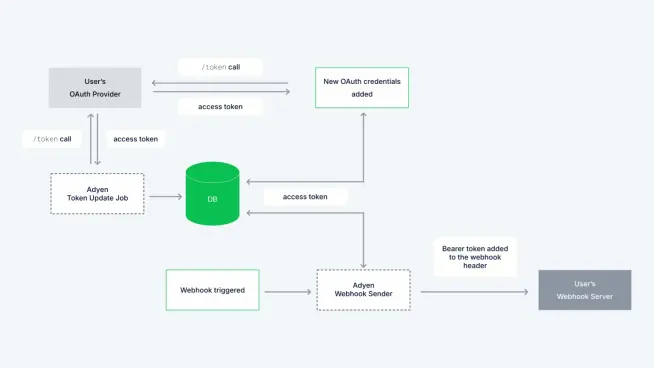
With an OAuth 2.0 implementation, Adyen acts as an OAuth client and requests an access token from your system to authorize the delivery of webhook events.
Adyen requests a token from your OAuth 2.0 Identity Provider's authorization server.
Your Authorization server validates the credentials and issues a token.
Adyen sends this access token in the header of each webhook event, allowing you to authenticate the request at your endpoint.
How to set up
Configuring OAuth 2.0 is a two-part process: first within your own Identity Provider (IdP), and second within the Adyen Customer Area.
Step 1: Configure your Identity Provider (IdP)
You need to create an application in your IdP’s developer console that Adyen can authenticate against.
Create a new application/client in your IdP.
Generate the required credentials: Client ID, Client Secret, and Token URL.
Define your Scope (optional, but recommended for granular control).
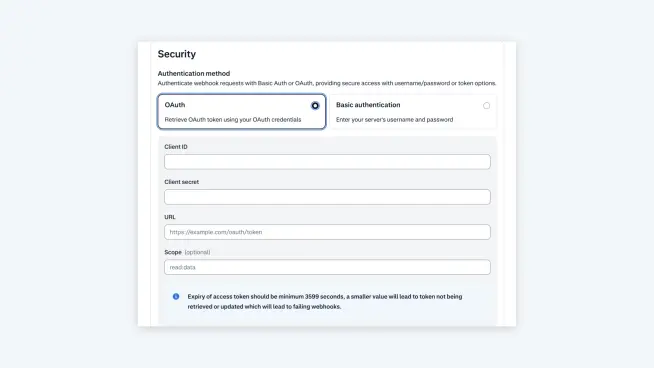
Configuration requirement: Ensure the Time-to-Live (TTL) setting for your access tokens is set to a minimum of 3599 seconds. This allows Adyen's background process to update efficiently without service interruption.
Step 2: Update your Webhook Settings in the Customer Area
Log in to the Customer Area and navigate to Developers > Webhooks.
Select the Standard webhook you wish to edit or add a new one, under Security, Select OAuth.
Enter the credentials you generated in Step 1 (Client ID, Client Secret, URL, and Scope).
Click Save Configuration and verify your connection.
Best practices for Webhook Security
Protect your Client Secret: The Client Secret must be protected and should never be embedded in client-side code to stop potential misuse.
Principle of least privilege for scopes: We strongly encourage following the principle of least privilege. Tokens should have the least permissions possible. Scopes (which are required for security purposes) define how and to what extent the system can access resources.
Rotate credentials: Static credentials are a risk. Even with OAuth, we recommend rotating the Client Secret stored in the Customer Area periodically. This proactive measure ensures that even if a secret was inadvertently logged or exposed on your side, attackers can't use it indefinitely.
What’s next?
OAuth 2.0 will be available for all Platform Webhooks by the end of Q2 2026. Keep an eye on The Latestfor updates, and subscribe to our developer newsletter.
Important Note: Although Basic authentication is still supported, we strongly recommend migrating to OAuth 2.0. it's the more secure standard, and we plan to deprecate Basic authentication in the long term.
Ready to upgrade?
Don't wait for the deprecation deadline. Upgrade your webhook security today by switching to OAuth 2.0. This industry-standard, short-lived token authorization significantly reduces risk and secures your integration.