Article
What is Tap to Pay and how can I set it up for my business?
Learn what Tap to Pay is, the steps to set up Tap to Pay for your business, and how it can speed up checkouts and improve customer experience.
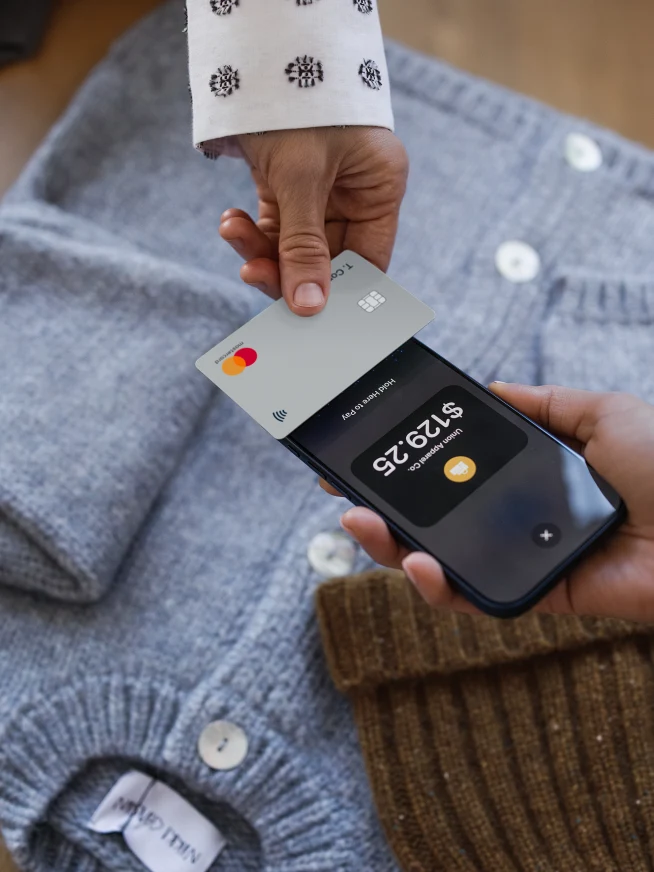
Your customers’ wallets are already on their phones. As digital wallets become the default way to pay, global users are expected to reach 5.2 billion in 2026.
Businesses that fail to adapt risk creating friction at the and falling behind evolving customer expectations. As mobile wallet usage in Australia continues to climb, with proximity mobile payment users reaching millions and influencing nearly half of all in-person transactions, the expectation for a quick checkout has never been higher.
For retail and hospitality, Tap to Pay offers a practical path forward by reducing reliance on bulky hardware, accelerating checkout, and meeting growing demand for fast in-person payments.
Whether you’re using Tap to Pay on iPhone or Android, we’re breaking down the benefits of this technology, how it works, and the most popular methods to activate it.
Table of contents:
What is Tap to Pay?
How does Tap to Pay work?
Is Tap to Pay safe?
Who uses Tap to Pay?
Benefits of using Tap to Pay
The most popular Tap to Pay methods
How to set up Tap to Pay for your business
What is Tap to Pay?
Tap to Pay is a method that allows shoppers to securely complete transactions by tapping their credit card, debit card, or against a payment terminal or mobile device.
This way, they don’t have to swipe their card or use cash. It’s an easier and faster way to pay, enhancing the overall shopping experience.
The rise of Tap to Pay and cashless payments
In recent years, contactless and cashless payments have seen a global surge in popularity:
95% of card payments in Australia are now contactless and only 13% of Gen-Z shoppers tend to carry cash.
As of June 2026, the UK had an estimated 1.57 billion contactless card transactions.
Singapore’s contactless payment market was valued at US$249 million in 2025, and projected to grow to US$332 million by 2032. .
42% of adults in the US no longer use cash for purchases in a traditional week.
Digital wallet users will exceed 5.2 billion worldwide in 2026.
The takeaway? Shoppers in Australia are increasingly looking for more flexible payment options, and businesses who adopt Tap to Pay technology can see massive growth.
Adyen’s Tap to Pay is a go-to payments solution for leading businesses. Easy install. Secure transactions. Fast checkouts. Contact our team to learn more.
How does Tap to Pay work?
Tap to Pay works by using near-field communication (NFC) technology to wirelessly transmit encrypted payment data between a shopper's payment device or card and the business’s payment terminal or compatible smart device.
Here’s a step-by-step breakdown of how Tap to Pay transactions work:
The business initiates the transaction. The business enters the exact purchase amount into their , payment terminal, or a compatible smartphone acting as a terminal.
The shopper presents their payment card or device. The shopper holds their NFC-enabled credit card, debit card, smartphone, or wearable device within a few centimeters of the merchant's payment reader.
The devices establish a connection. The NFC technology securely transmits the encrypted payment details from the shopper's device to the payment terminal in less than a second.
The payment network authorises the transaction. The payment gateway immediately routes the encrypted data to the acquiring bank and the major card networks for approval.
The payment is confirmed. The merchant receives an instant approval notification on their screen, and the checkout process is complete.
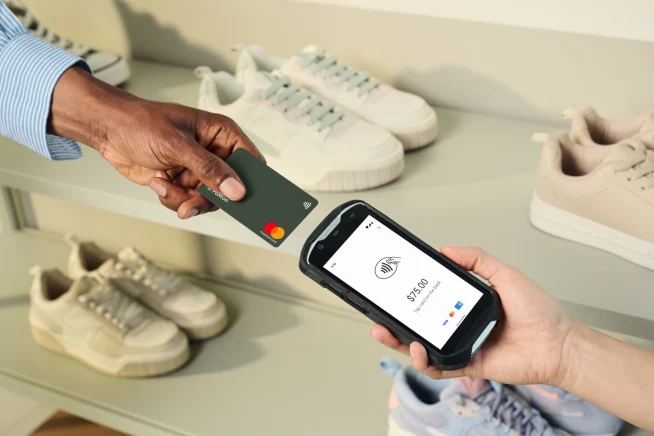
Because these transactions rely on tokenisation, the actual card details are never stored directly on the merchant's device. This ensures maximum security against while maintaining a smooth payment flow.
Plus, since Tap to Pay is software-based, you can create customised in-person payment options across locations – turning compatible devices like phones, tablets, and POS systems into a flexible terminal fleet.
Is Tap to Pay safe?
Yes, Tap to Pay is a secure way to make payments and is less susceptible to fraudulent activities that can occur after swiping your card.
With Adyen’s , payment transactions are encrypted and payment data isn’t stored locally on your phone.
Encryption is a protective measure used to protect personal data from being stolen or compromised – making every transaction safer.
Want to stay in the know about all things payments? Subscribe to our newsletter for news, insights, and more.
Who uses Tap to Pay?
Businesses of all types are using Tap to Pay:
Platforms like , where POS integrations need to be reliable and scalable.
Retailers like , where store team members can provide personalised assistance and complete checkout anywhere on the shop floor, reducing the need for shoppers to wait in line.
Hospitality brands like , where effortless check-ins and checkouts can be a game-changer for guest satisfaction.
Food and beverage SaaS companies, where dynamic payment options give customers more freedom.
Benefits of using Tap to Pay
The top three benefits of using Tap to Pay – regardless of your industry are:
1. Drive revenue
With Tap to Pay, you remove the dependence on traditional payments hardware and minimise their expenses.
Not only does this reduce costs but Tap to Pay’s fast setup facilitates more seamless rollouts and scalability.
2. More flexible payment options
Shoppers are increasingly seeking more .
With Tap to Pay, you can transform any compatible device (e.g. smartphone) into a terminal – creating a more simplified and effortless checkout experience.
It gives shoppers an easier and faster way to purchase and lets businesses cater to their customers.
For example, say a customer is trying on shoes near a display area. Rather than queuing to buy them, they can tap their payment method on your smartphone and walk out the door. Simple.
3. Secure and fast checkouts
Payment fraud can have a massive impact on efficiency and consumer trust – making security an important factor for brands.
As mentioned earlier, Tap to Pay is a secure payment solution that speeds up checkouts and enhances the overall customer experience.
And for businesses, a happy customer is key.
The most popular Tap to Pay methods (so far)
Whether your customers are using a smartwatch or digital wallet, these are the most common methods for making a contactless payment:
1. Debit and credit cards with NFC
Many new debit and credit cards now have built-in NFC technology, allowing them to easily accept contactless payments.
Once the shopper “taps” or hovers their card near the compatible device, the transaction goes through.
2. Digital and mobile wallets
Digital wallets, like Apple Pay or Google Pay, let customers make contactless and online payments – with their mobile phones.
And according to , 35% of Australian shoppers use digital wallets and other payment methods that don’t involve cash, cards, or bank payments.
How does it work? Similar to using an NFC-integrated physical payment card, customers simply open their digital wallet on their phone, and “tap” or hover it to make a payment.
3. Smartwatches and other wearables
Where digital wallets mean you don’t have to carry a physical payment card, smartwatches take convenience to another level.
With this type of payment method, all customers need is a compatible smartwatch or wearable, and voila – they can easily “tap” or hover it to pay.
The speed and contactless nature of Tap to Pay is resonating with consumers and businesses alike.
As its widespread adoption and acceptance continue to grow, it’s time to get on board and transform your devices into versatile payment terminals.
Ready to enable Adyen’s Tap to Pay solution? Contact our team to learn more.
How to set up Tap to Pay for your business
Getting started with tap to pay is a simple process. You need an NFC-enabled terminal or a compatible mobile device. Adyen helps merchants turn on Tap to Pay on Android or iPhone without needing extra hardware, which helps lower costs and allows staff to accept in-person payments anywhere in the store.
How to set up Tap to Pay on iPhone with Adyen
Merchants can accept payments directly on supported iPhones, removing the need for traditional terminals. This flexibility helps you scale up during busy periods or take your business on the road without additional equipment costs.
To turn on Tap to Pay on iPhone using Adyen, follow these steps:
Ensure your staff use an iPhone XS or newer running the latest iOS version.
Download and integrate the Adyen POS app or embed the Adyen SDK into your existing iOS point of sale application.
Log in to your merchant account and activate Tap to Pay on iPhone in your configuration settings.
Request your staff to open the app, present the payment screen, and ask the shopper to tap their contactless card or e-wallet on the top of the iPhone.
What’s the difference between Tap to Pay on iPhone and Tap to Pay on Android?
The primary difference between Tap to Pay on iPhone and Tap to Pay on Android is that with iPhone, users tap their payment instrument on the front screen of the device to pay and with Android, users tap the back of the device.
Tap to Pay with Adyen
As Tap to Pay adoption continues to grow, businesses must ensure their payment infrastructure can accept all types of contactless transactions.
Adyen provides businesses with a single, unified platform to seamlessly accept contactless payments across all devices and global sales channels.
Adyen’s financial technology allows merchants to transform compatible iPhones and Android devices into secure, flexible payment terminals without needing extra hardware.
By integrating Adyen's Unified Commerce solutions, your business can quickly scale its in-person payment capabilities, optimize the shopper experience, and leverage rich data insights to fuel long-term growth.
Are you ready to transform your in-person payment experience and speed up your checkouts? Explore our solutions or reach out to our team to get started.
Key summaries
Tap to Pay is an NFC-based contactless payment method that requires no swiping or physical card insertion.
Shoppers can pay instantly using NFC-enabled credit or debit cards, digital wallets, and smart wearables.
The step-by-step transaction process is completed in seconds via secure, encrypted data transmission.
Merchants can use Tap to Pay on smartphones to eliminate hardware costs and enable mobile queue busting.
Adyen provides secure, unified Tap to Pay solutions that seamlessly integrate with both iPhone and Android devices.
FAQs
Tap to Pay is supported by most modern payment terminals and smart devices equipped with NFC technology. This includes NFC-enabled credit and debit cards, smartphones using digital wallets, and smartwatches. Merchants can also use compatible iOS and Android devices to accept payments.