Article
Click to Pay: Taking online payments to the next level
Click to Pay is transforming manual card entry at checkout. Learn how to take the convenience of contactless payments to the online world.
Manual card entry is still the most common flow for online payments. You’re probably familiar with the inconvenience of needing to get up and get your card (if it’s not already at hand), manually typing in your card details, and double-checking to make sure everything is correct.
These challenges negatively affect your business’s conversion rate and involve security risks, such as card details being stolen or shared with third parties, which in turn impacts your revenue.
As customer expectations increase, shoppers are expecting smooth and seamless checkouts, no matter if they're paying online or in stores. 44% of shoppers in Australia will abandon their online shopping carts or leave the store if the checkout process takes too long. This has a big impact on revenue coming from online payments.
We know how much investment goes into getting customers to the checkout page, and we understand how frustrating it is to lose them after they’ve decided to buy the product or service.
As a business, it’s crucial to make payments as easy, quick, secure, and trustworthy as possible to not risk losing your customers.
Checkout enhancements, such as Click to Pay, digital wallets, or express checkouts aim to address these challenges and deliver an online checkout that exceeds your customer’s expectations while keeping payments safety and conversion success a priority.
What is Click to Pay?
Click to Pay is a new way of paying within your existing card payment flow. The payment process is the same, but instead of entering the card details manually, enrolled customers see their Click to Pay cards on the screen. This brings the convenience of contactless payments to the online world as it eliminates the need for customers to manually enter card details at checkout.
Click to Pay is built on EMV specifications and is supported by major card schemes, such as Visa and Mastercard, and millions customers globally are already enrolled. Adding it to your checkout allows you to tap into a large customer base and offer them safe and seamless payments.
Benefits of Click to Pay
Click to pay is a universal solution that works across devices, businesses, and browsers. There are many reasons businesses should offer it to their customers.
Increase revenue
Conversion rates: Create an easy and seamless payment experience without the need to enter card details, leading to more people clicking pay, higher success rate, and increased conversion.
Authorisation rates: Use a secure token to authorise the payment. Our research shows that the strategic use of network tokens boosts authorisation rate by 6%.
Customer experience: Create trust and an intuitive experience for guests, first time customers, and for customers who only want to store card details with their bank.
Processing costs: Click to Pay has the same processing costs as regular Visa and Mastercard transactions.
Secure
Encryption: Use encryption to protect card details and make sure they stay with the issuing bank.
Chargebacks: Reduce the risk of fraud and chargebacks by verifying the customer through a recognised device or a one-time password (OTP).
How does Click to Pay work?
Before using Click to Pay, the customer needs to create an account. This will be done primarily via their bank, or alternatively during the checkout.
After the customer creates an account, they can use Click to Pay, which goes as follows:
1. The customer is identified using email or phone.
2. They’re verified using an OTP or a recognised device.
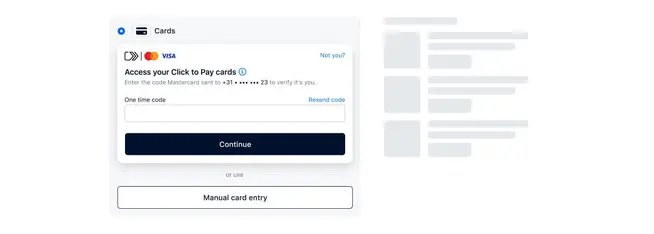
3. The customer gets access to their stored cards and can view them on the screen.
4. They choose their preferred card and complete the payment within seconds.
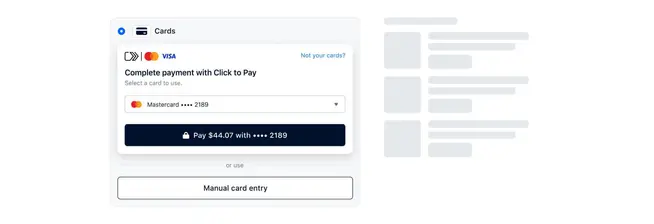
There are many ways to optimise your checkout. Click to Pay is one option that improves the checkout experience by eliminating the need to manually enter card details. Click to Pay is the next step for businesses that want to bring the convenience of contactless payments to the online world and take their checkout to the next level.
Activating Click to Pay with Adyen is a simple process. Check out our documentation or reach out to our sales team to learn more about how to activate Click to Pay.
Click to Pay vs Apple Pay and Google Pay
Click to Pay, Apple Pay, and Google Pay all remove manual card entry at checkout, but they store and authenticate a shopper's details in different ways. That difference shapes who can use each one and where they show up in your checkout.
Storage
Click to Pay
Card details held by the card scheme
Apple Pay / Google Pay
Card details held on the shopper's device or OS account
Availability
Click to Pay
Works on any browser or device
Apple Pay / Google Pay
Requires a supported device, OS, or browser
Authentication
Click to Pay
One-time password or trusted-device recognition
Apple Pay / Google Pay
On-device biometrics, such as Face ID or fingerprint
Checkout placement
Click to Pay
Sits inside or beside standard card entry fields
Apple Pay / Google Pay
Shown as a separate express checkout button
Setup
Click to Pay
Account created via card issuer or at checkout
Apple Pay / Google Pay
Cards added inside the Apple Wallet or Google Pay app
Because they solve the same problem in different ways, they're not competing for the same shopper. Apple Pay and Google Pay serve people already set up in that ecosystem. Click to Pay covers everyone else, including desktop shoppers and anyone on a device or browser that doesn't support a digital wallet. Offering both gives you coverage across both groups.
How Adyen supports Click to Pay
Adyen processes Click to Pay payments as standard network token card transactions, so there's no additional scheme fee for offering it alongside your existing card payments.
You can add it two ways: Embedded directly inside Adyen's Card Component or Drop-in, where it appears automatically next to standard card fields, or as its own component alongside your other payment methods.
Either route runs on the same unified commerce platform as the rest of your Adyen integration, so the network tokens that recognise a shopper online can also be used to recognise them in-store, without extra integration work on your side.
If reducing guest checkout drop-off matters to your business, Click to Pay is worth adding to your card offering. Explore our Click to Pay documentation or get in touch with our team to get started.