Article
Stop those accidental API breaks: A guide to API diffing for Swift developers
Stop accidental API breaks in your iOS SDK. Discover how the open-source Swift Public API Diff tool automates checks in your CI to ensure easy updates.
Singapore is a hotbed of app design and development. There are big groups out there, like the iOS Dev Scout Singapore community, where developers can exchange ideas and find solutions to their biggest issues.
Here at Adyen, we’re developers, too, so we understand the frustration when you have to deal with “buggy” software. One of the biggest is when code reviews fail to catch a problem, and now you’ve got accidental breaking changes in your public API. So we’ve come up with a few simple steps to make sure your next SDK version is a clean one.
API stability is a major challenge
We are in a constant struggle to evolve our APIs while maintaining stability. One wrong move — like removing a parameter or changing a method signature — can break our clients' applications. Swift has a pretty robust type system that helps catch many issues at compile-time, but you need specialized tooling to detect API-breaking changes before they reach production.
Finding a solution: From simple to sophisticated
There are some available solutions out there, each with their own benefits and challenges:
Pure Swift Package Manager
xcodebuild & swift-api-digester
Swift Public API diff
Swift Package Manager's built-in tool (and why it's not enough) For a lot of users, their first step might be to just use SPM. After all, it ships with a tool that promises to detect API-breaking changes by comparing them against a previous version.
swift package diagnose-api-breaking-changes [commit/branch/tag]
But there's a catch: while this works great for pure Swift packages, it falls short for projects targeting iOS, even when you try to force iOS SDK usage.
        swift package \
    -Xswiftc "-sdk" \
    -Xswiftc "$(xcrun --sdk iphonesimulator --show-sdk-path)" \
    -Xswiftc "-target" \
    -Xswiftc "x86_64-apple-ios18.1-simulator" \
    diagnose-api-breaking-changes [commit/branch/tag]
A more robust approach: xcodebuild + swift-api-digester
This combination offers a more suitable option for iOS projects. Here's how to use it:
1) First, build your project
        xcodebuild \
    -scheme "YOUR_TARGET_NAME" \
    -derivedDataPath .build \
    -sdk "$(xcrun --sdk iphonesimulator --show-sdk-path)" \
    -target "x86_64-apple-ios18.1-simulator" \
    -destination "generic/platform=iOS Simulator"
2) Run the command to diagnose API changes
        xcrun swift-api-digester -diagnose-sdk \
    -abi \
    -module "YOUR_TARGET_NAME" \
    -use-interface-for-module "YOUR_TARGET_NAME" \
    -BI .../baseline_version/.build/Build/Products/Debug-iphonesimulator \
    -I .../updated_version/.build/Build/Products/Debug-iphonesimulator \
    -bsdk "$(xcrun --sdk iphonesimulator --show-sdk-path)" \
    -sdk "$(xcrun --sdk iphonesimulator --show-sdk-path)" \
    -target "x86_64-apple-ios18.1-simulator" \
    -o api_diff.txt
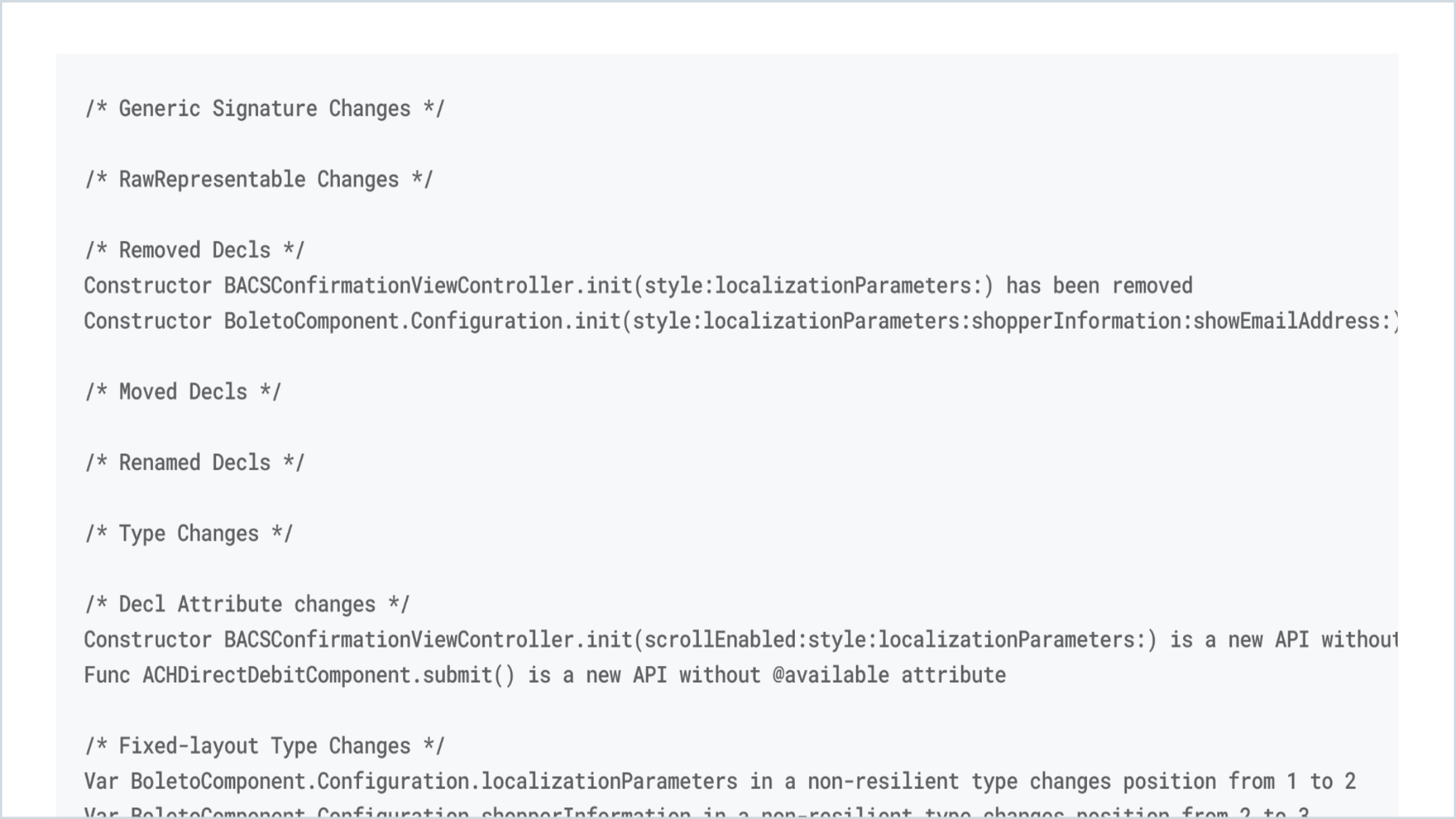
3) Verify the output with the differences
The power move: Swift Public API Diff
We built the Swift Public API Diff tool (and made it open-source) as an alternative to swift-api-digester. Our Swift Public API Diff provides more detailed and contextual information, making it simpler to understand changes during code reviews.
It provides a detailed summary of changes and lets you specify the desired access level. As an open-source project, it can be customized to meet individual needs and easily integrate into your existing workflows.
Swift Public API Diff leverages .swiftinterface files that contain rich information about your APIs.
Here's how to generate these files independently:
        xcodebuild clean build \
    -scheme "YOUR_TARGET_NAME" \
    -derivedDataPath .build \
    -sdk "$(xcrun --sdk iphonesimulator --show-sdk-path)" \
    -destination "generic/platform=iOS" \
    BUILD_LIBRARY_FOR_DISTRIBUTION=YES
The .swiftinterface files are located inside the swiftmodule directory of the scheme within your specified -derivedDataPath.
Depending on the usage of the @_spi and/or access modifiers, there can be multiple .swiftinterface definitions with the following extensions:
.private.swiftinterface (exposes @_spi interfaces + package & public)
.package.swiftinterface (exposes package interfaces + public)
.swiftinterface (exposes only the public interface)
The Swift Public API Diff can generate the .swiftinterface files for you and uses to parse these files into a Swift model, which allows you to compare the elements individually.
Here’s an example of how to run the diff on two remote versions of a GitHub project:
        swift run public-api-diff \
    project \
    --platform iOS \
    --new "develop~https://github.com/Adyen/adyen-ios.git" \
    --old "5.12.0~https://github.com/Adyen/adyen-ios.git"
For more examples and use-cases you can refer to the page.
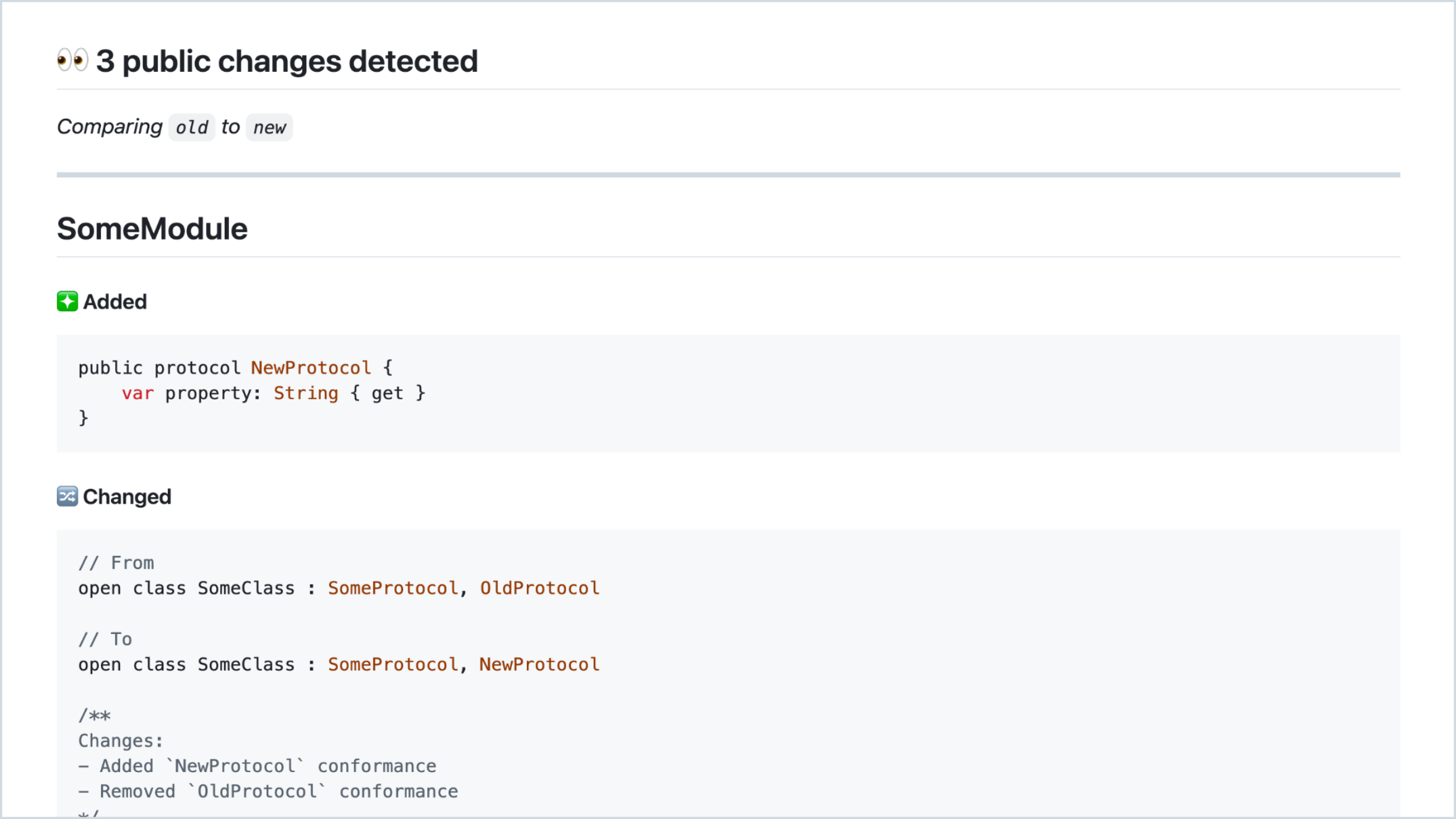
The output is formatted in an easy-to-understand way, highlighting additions, removals, and changes.
Here is example of how the markdown output looks as a Github comment:
The best ways to maintain API stability
Delivering stable APIs is crucial to ensure that new versions do not affect existing applications while still incorporating new features and bug fixes.
Add API diffing to your CI pipeline: This helps catch breaking changes before they make it to your main branch. Check out how uses GitHub actions to detect API changes.
Use semantic versioning: Semantic versioning will communicate the to your users.
Document breaking changes: Keep a clear changelog and provide a migration guide for major SDK upgrades.
Plan for API evolution: Always consider backward compatibility when designing new features.
Deprecation strategy: Announce deprecations in advance to ensure developers are prepared when functionalities are removed from the SDK.
How to get started
First, integrate API diffing into your development workflow:
Choose the tool that best fits your needs (At , we've made an indispensable tool for our iOS projects).
Set up automated checks in your CI pipeline.
Establish a process for reviewing and communicating API changes.
Create guidelines for API evolution in your team.
Remember: the best API break is the one that never happens. With these tools and practices in place, you can evolve your SDK with confidence while keeping your users happy. Ready to try it out? Use in your next PR review and watch it catch potential breaks before they reach your users.