Article
Click to Pay: a one-click checkout that works with any payment stack
How it stacks up against Apple Pay, Google Pay, and Stripe's Link, and how to add it through Adyen
Manual card entry is a common cause of lost conversions. Baymard Institute puts roughly a quarter of cart abandonments down to forced account creation or clunky payment entry. So the question for many payments and ecommerce managers is:
How can we support one-click payments without requiring shoppers to create an account?
There are a couple of ways to support these express checkouts:
Integrate digital wallets like Apple Pay or Google Pay, letting shoppers check out using payment and address details already saved with these providers. Given the ubiquity of these methods, it's highly likely that the shopper will have one or the other. However, there's no guarantee, and they still rely on shoppers having downloaded and activated their wallet.
Integrate an accelerated checkout such as Stripe's Link or Shopify's Shop Pay, which save a shopper's card and address details on first use and reuse them on return visits. These work well but only within their own ecosystem. If you run a different payment stack, neither can be called on at checkout.
Click to Pay avoids this trade-off. Because it runs on a card scheme standard rather than a specific processor or platform, a shopper's saved card details are available at checkout no matter which payment provider or ecommerce platform you use or which apps or wallets your shopper has activated.
In this article, we'll help you decide whether Click to Pay is worth adding to your checkout and how it fits alongside the payment methods you already offer. We'll cover:
What Click to Pay is
The benefits for businesses offering it
How the shopper experience works, step by step
Click to Pay vs Apple Pay and Google Pay
How to add Click to Pay to your checkout with Adyen
Want to learn more about Adyen's Click to Pay integration or other payments methods we support? Get in touch.
What is Click to Pay?
Click to Pay is a digital checkout standard built on EMV specifications. When a shopper reaches checkout, it retrieves their saved card details directly from the card scheme, whether that's Visa, Mastercard, or American Express, rather than asking them to type out a card number or set up a new account.
Because the card networks manage the standard, it isn't tied to a particular checkout provider, device, or operating system. Any business that supports card payments can offer it, and any shopper with a supported card can use it.
How does Click to Pay work?
Before using Click to Pay, the customer needs to create an account. This will be done primarily via their bank or alternatively during the checkout.
After the customer creates an account, they can use Click to Pay, which goes as follows:
1. Identification: The customer is identified using email or phone.
2. Verification: They’re verified using an OTP or a recognised device.
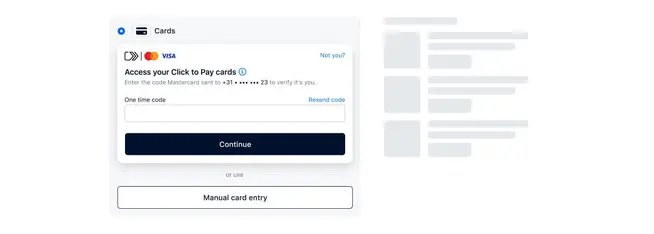
3. Card selection: The customer gets access to their stored cards and can view them on the screen.
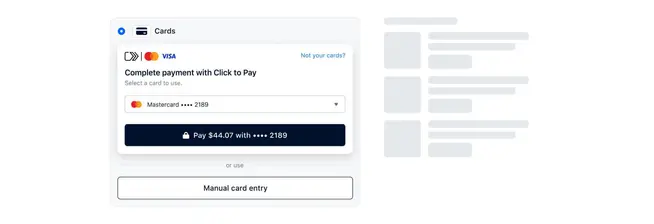
4. Payment: They choose their preferred card and complete the payment within seconds.
Benefits of Click to Pay
Beyond removing manual card entry at checkout, Click to Pay brings a few advantages that matter specifically for enterprise businesses managing payments at scale.
Fewer abandoned carts
Manual card entry is a known drop-off point, and Click to Pay removes it for any shopper who's already registered with a scheme, without asking them to create a new account with your business first.
Stronger security
Card numbers are never exposed to your business. Payments run on network tokenization and scheme-level authentication, so sensitive card data stays with the network rather than passing through your systems.
Recognition across channels
A network token created through an online Click to Pay transaction can also be recognised in-store, giving you a single view of a returning customer across online and point-of-sale.
No dedicated app or hardware to support
Click to Pay works in any browser, on any device. There's nothing for the shopper to install and nothing extra for your team to maintain.
Works alongside what you already offer
Click to Pay sits next to Apple Pay, Google Pay, and standard card entry rather than replacing them, so you're not choosing one checkout option over another.
Click to Pay vs Apple Pay and Google Pay
Click to Pay, Apple Pay, and Google Pay all remove manual card entry at checkout, but they store and authenticate a shopper's details in different ways. That difference shapes who can use each one and where they show up in your checkout.
Storage
Click to Pay
Card details held by the card scheme
Apple Pay / Google Pay
Card details held on the shopper's device or OS account
Availability
Click to Pay
Works on any browser or device
Apple Pay / Google Pay
Requires a supported device, OS, or browser
Authentication
Click to Pay
One-time password or trusted-device recognition
Apple Pay / Google Pay
On-device biometrics, such as Face ID or fingerprint
Checkout placement
Click to Pay
Sits inside or beside standard card entry fields
Apple Pay / Google Pay
Shown as a separate express checkout button
Setup
Click to Pay
Account created via card issuer or at checkout
Apple Pay / Google Pay
Cards added inside the Apple Wallet or Google Pay app
Because they solve the same problem in different ways, they're not competing for the same shopper. Apple Pay and Google Pay serve people already set up in that ecosystem. Click to Pay covers everyone else, including desktop shoppers and anyone on a device or browser that doesn't support a digital wallet. Offering both gives you coverage across both groups.
How Adyen supports Click to Pay
Adyen processes Click to Pay payments as standard network token card transactions, so there's no additional scheme fee for offering it alongside your existing card payments.
You can add it two ways: Embedded directly inside Adyen's Card Component or Drop-in, where it appears automatically next to standard card fields, or as its own component alongside your other payment methods.
Either route runs on the same unified commerce platform as the rest of your Adyen integration, so the network tokens that recognise a shopper online can also be used to recognise them in-store, without extra integration work on your side.
If reducing guest checkout drop-off matters to your business, Click to Pay is worth adding to your card offering. Explore our Click to Pay documentation or get in touch with our team to get started.